ISoft Data Systems is working on developing a Model Context Protocol, or MCP, that allows AI apps such as Claude to connect to your ITrack Enterprise data through the Enterprise API.
AI connectors are currently undergoing beta testing and may not be available to all users. Contact us for more information.
1️⃣ Prerequisites
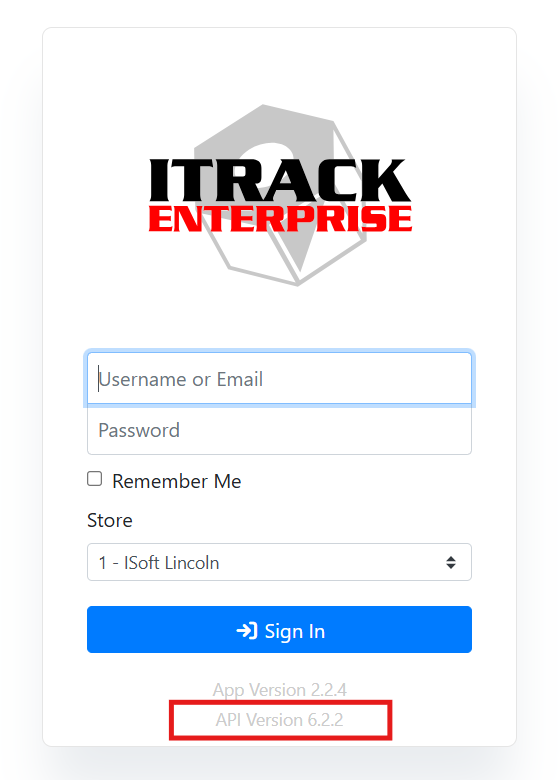
The MCP Connector requires version 6.0 or higher of the ITrack Enterprise API. Your API version can be found on your login screen.
You will also need an account with with an AI app that supports MCP connectors and AI Skills.
❓ Which AI App Can I Use?
ISoft has primarily used Claude by Anthropic for testing, however, any AI app that supports a Custom Connector (also known as an MCP) can be used. Since every application is different, please refer to your application’s help guide for assistance. Please note that each app may also vary on what subscription level is needed for custom connectors. Some of them may provide it for free, or it may be behind a paid or enterprise tier of service.
Apps that also support AI Skills are also highly recommended, since your AI app will perform a lot better and more accurately answer questions if it has the ITrack skill installed.
Read more about AI Skills.
⭐ Recommended Apps
-
Claude by Anthropic
-
Chat GPT by OpenAI
-
Gemini Enterprise by Google
-
Vibe by Mistral
-
Copilot Studio by Microsoft*
-
https://learn.microsoft.com/en-us/microsoft-copilot-studio/mcp-add-existing-server-to-agent
-
https://learn.microsoft.com/en-us/microsoft-copilot-studio/nlu-generative-answers-custom-data
-
*Copilot Studio supports custom instructions when building an agent, it doesn’t use skills the way Claude, Vibe and Gemini do. It may be possible to set up Copilot in a similar way, but it is not exactly the same as using skills.
-
The following apps support custom connectors, but don’t offer skill support. They can be used but won’t perform as well.
-
Perplexity AI - https://www.perplexity.ai/help-center/en/articles/13915507-adding-custom-remote-connectors
AI app development changes quickly. You should check with your AI app in case information here is outdated. ISoft can’t guarantee or test the performance of all AI apps.
🌎 Is My Data Exposed Online If I Use AI?
ISoft can’t make any guarantee of privacy using AI apps. Your ITrack database itself is not shared with your AI app, and it can only access that information when you ask it a question or set up a task.
Your AI app might allow you to opt out of collecting training data in their privacy settings or when first signing up for an app.
For more information, refer to your app’s privacy policies.
-
Claude (Anthropic) - https://www.anthropic.com/legal/privacy
-
ChatGPT (OpenAI) - https://openai.com/policies/
-
Gemini Enterprise (Google) - https://cloud.google.com/gemini/docs/discover/data-governance
-
Vibe (Mistral) - https://legal.mistral.ai/terms/privacy-policy
-
Copilot Studio (Microsoft) - https://www.microsoft.com/en-us/privacy/privacystatement
-
Perplexity AI - https://www.perplexity.ai/hub/legal/privacy-notice
If you share a conversation or chat by using the Share button in a chat, this may expose your conversation online even if you opt out of sharing your data with your AI app.
⚙️ What are Tools?
When you connect an AI app to ITrack, the connector provides the AI with a set of tools, which are specific actions the AI can take on your behalf within that system.
A tool is a single capability. For example, the ITrack MCP connector provides tools that allow actions such as searching the database, getting inventory asset value, and calculating dates. When you ask the AI a question about your data, it decides which tools to use, calls them in the right order, and assembles the results into an answer.
Tools are provided by the connector itself. You don't install or configure them. When the connector is connected and active, its tools are automatically available to the AI.
⚙️ What are Skills?
Skills are pre-built instruction sets that extend an AI app’s capabilities for specific tasks. When a skill is installed, the AI app automatically gains specialized knowledge about how to handle that task such as how to interpret your prompts, how to structure its work, and what pitfalls to avoid.
Skills are like a specialized app inside the AI app. Instead of relying on the AI app’s general-purpose reasoning for every task, a skill gives it a set of knowledge for a particular job.
Why are skills useful?
-
Consistency - The AI handles the same type of task the same way every time, rather than improvising a new approach.
-
Better results - Skills encode hard-won best practices, so you get higher-quality output without needing to guide the AI through every step.
-
Less back-and-forth - The AI already knows what it needs to do and in what order, reducing the need to correct or redirect it.
ISoft has built skills specifically to teach AI apps how to look up and understand your data. With it, the AI app knows how your data interconnects and understands the business context behind it, so answers reflect how your operation actually works rather than a generic interpretation of the numbers.
Unlike tools, skills have to be installed within your AI app account. Skills will be shared with you by ISoft when you first get started.
❓ What’s the Difference Between Tools and Skills?
Skills and tools work together, but they do different things.
A tool gives the AI the ability to do something, like looking up a part or retrieving a work order. Think of tools as the AI's hands: they let it reach into a system and pull back real data.
A skill gives the AI the knowledge to do something well, like knowing which questions to ask, how your data is structured, and what the results mean in context. Think of skills as the AI's training: they shape how it thinks about a task before it ever uses a tool.
The biggest difference between skills and tools are skills need to be installed inside your AI app, while tools come with the connector.
In short, tools give the AI access; skills give the AI understanding. For the best results with ITrack data, you want both.